MeshCore: companions, repeaters, and joining a channel
Please read the FCC rules. MeshCore radios are regulated by the FCC even though no license is required. Know what is allowed before you transmit: FCC rules for Meshtastic, MeshCore and Reticulum (Part 15).
Companion node
Your personal radio. It pairs with the MeshCore app on your phone over Bluetooth, and it is how you send and receive messages. Every person on the network needs one. A companion does not relay other people’s messages. (MeshCore has a separate “off-grid” repeat mode meant for use away from public meshes; leave it off here.)
Most newcomers should start with a companion. It is cheap, easy to set up, and lets you try the network before you invest in anything bigger.
Repeater
A relay. It has no phone and no user: its only job is to rebroadcast other people's messages so the network reaches farther. Repeaters work best in a fixed, high spot with a clear view (roof, tower, hill) and are often solar powered.
Repeaters help everyone, but placement and settings matter. Talk to the local group before putting one up so it fits the network.
MeshCore apps
The MeshCore app pairs with a companion radio. It handles contacts, channels, and radio settings.
MeshCore (official)
Free. Made by the core MeshCore team. Pairs with a companion radio over Bluetooth.
MeshCore on desktop and web
The same team offers a web app and offline installers for Windows and macOS.
MeshCore Flasher (website)
Not an app. Flash companion or repeater firmware from Chrome or Edge on a computer.
MeshCore Map (website)
See nodes and repeaters around the world, including near St. Paul.
Download only from the official links on meshcore.io. Store pages can change and some apps are updated or removed, so if a link fails, search the app name in your store.
Free and open-source extras for MeshCore
The official app is the safest starting point. These are unofficial, community-made clients. Check their pages before relying on one, and never enter your channel keys into an app you do not trust.
MeshCore Open
An unofficial, MIT-licensed client for Android and iPhone (also desktop and web), still labeled beta on its own site. It adds a live node map, line-of-sight checks, offline map tiles, and repeater management. On Android it is on Google Play. On iPhone it is only in a limited TestFlight beta, so the invite may be full.
MeshCore One
An unofficial iPhone and iPad client for MeshCore companion radios, in the App Store. Its developers publish code on GitHub, but we could not confirm the license, so check the repository before you rely on it.
Organic Maps
Free, open-source offline maps built on OpenStreetMap, with no ads or tracking. Good for scouting a node site and for finding your way when the cell network is down.
OsmAnd
Open-source offline maps with contour lines and terrain detail, which helps when judging line of sight. The free store versions limit some features; the F-Droid build is fully free.
Unofficial apps are not made or checked by the MeshCore core team. Store pages can change and some apps are updated or removed, so if a link fails, search the app name in your store. F-Droid is a free app store for open-source Android apps. We are not affiliated with these projects.
Set up a companion, step by step
- Get a supported radio. The device list is on meshcore.io. Heltec V3 is one of the supported companion boards.
- Flash it. On a computer, open flasher.meshcore.io in Chrome or Edge. Plug in the radio with a USB cable that carries data. Choose your device, choose the Companion firmware (the Bluetooth version), and flash. Attach the antenna first.
- Install the MeshCore app: App Store or Google Play (also linked from meshcore.io).
- Pair. Turn on your phone's Bluetooth and power on the radio. In the app, choose to connect, pick your radio, and enter the PIN shown on its screen. If no PIN is shown, the usual default is
123456. - Choose the radio preset. In the app's radio settings, select the USA preset and save. This must match the local network.
- Check the Public channel. It loads automatically. You do not need to add it.
- Join our private channel using the steps below.
Join the West Seventh private channel
A private channel is joined with its name and a secret key. You can scan a QR code or type the key in. Use whichever is easier. Both give the same result.
Option A: scan the QR code
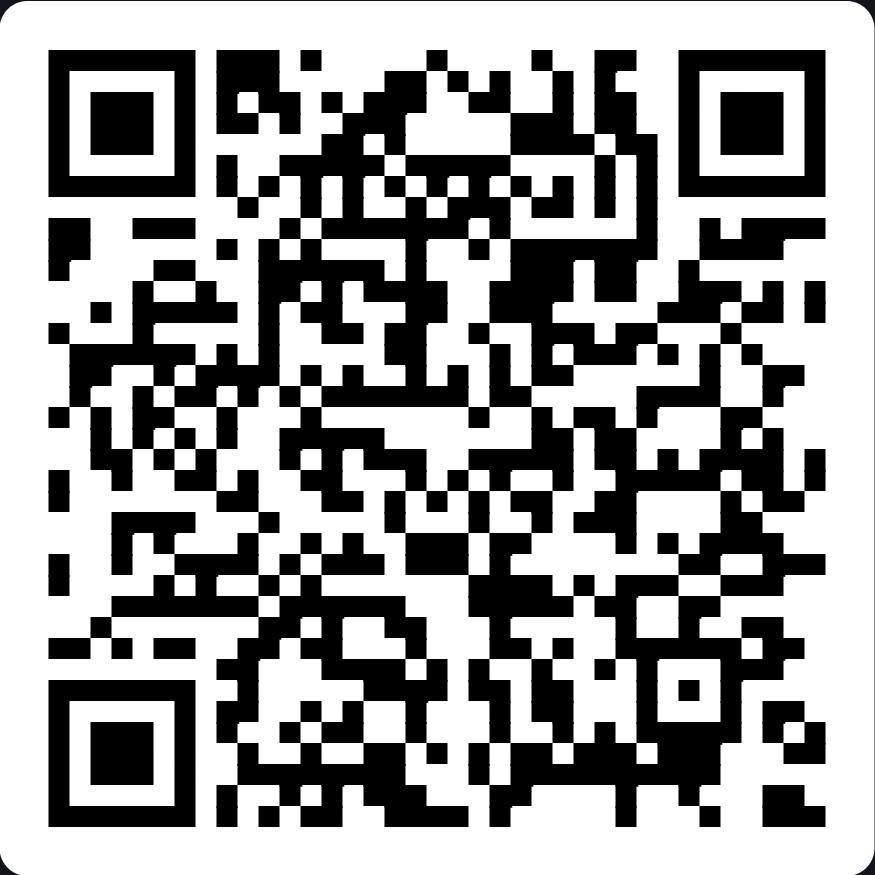
- Show this QR code on a computer, another device, or a printout. You can't scan it from the same phone that is showing it.
- Open the MeshCore app and make sure your radio is connected.
- On the home screen, tap the three dots in the top right.
- Tap Add Channel, then Scan QR Code. Allow camera access if asked.
- Point the camera at the code and confirm.
- Open West Seventh in your channel list and send a test message.
Option B: enter the key
- Tap Copy name and Copy secret below, or write them down. If you are viewing this page on your phone, copy each one just before you paste it.
- Open the MeshCore app and make sure your radio is connected.
- Tap the three dots in the top right, then Add Channel.
- Tap Join a Private Channel.
- For the name, enter
West Seventhexactly: capital W, capital S, one space. - For the secret, paste
56c32ef69e219934286ef2982c2db0fb(32 characters, letters a–f and numbers only). - Save, then open West Seventh and send a test message.
Menu names can change between app versions. If a label looks different, look for "Add Channel" and the private or QR option, or see the app guide at docs.meshcore.io. Don't join the channel until your radio preset is set to USA.
Why we use meshcore.io, not meshcore.co.uk
This site points only to meshcore.io, its docs, and the official GitHub repository. We do not link to or recommend meshcore.co.uk.
What happened, in short. In spring 2026 the MeshCore project split. According to the core development team's own accounts (“Why the split?”, April 23, 2026, and “Help Us Save MeshCore”, July 4, 2026):
- A former team member filed a trademark application for the name “MeshCore” (UK, March 29, 2026) without telling the rest of the team, and the team says he later filed in the EU too. The team says he claims to own the brand.
- That person uses the word “official” for a separate product line, and the team says he now mostly promotes his own products. The team says it asked him to withdraw the filings, and that he declined and said a commercial agreement would be needed.
- The team also says he used AI code generation heavily on parts of the ecosystem (app, flasher, standalone devices) without telling them.
- Talks broke down. The core team launched meshcore.io, with the firmware on GitHub as the source of truth. The former member still controls the meshcore.co.uk site and the original Discord server. The team says it has hired lawyers and filed its own trademark applications, and by its July 28 update the UK application was in “opposed” status, with no ruling yet. It has also asked the community for donations to cover legal costs.
Our position. MeshCore started as an open community project, and we support that. We do not support attempts to take ownership of the MeshCore name, or to monetize or privatize the project, by those behind meshcore.co.uk.
The other side. Andy Kirby, who runs meshcore.co.uk, has posted a video response, summarized by NodakMesh. He says the trademark filing was meant to protect the public-facing brand, not to take ownership of the open-source code. He says he never claimed to be a core firmware developer, that he uses AI as a tool, and that communication “could have been better.” He also describes meshcore.co.uk as the commercial home for his MeshOS software.
This is a summary of published accounts of an ongoing dispute, not a legal finding. The core team’s statements are quoted from its own posts, and Kirby’s position is described second-hand. Details may change, so read the original posts for yourself.
Looking for a radio? See our recommended MeshCore gear. The buttons on that page are Amazon affiliate links. As an Amazon Associate I earn from qualifying purchases, at no extra cost to you, and the commissions go toward putting more radios in the community’s hands. Receipts available on request. Disclosure.